Shotloop
Make short videos from code, one shot at a time.
This app runs on macOS. Open this page on a Mac to download it.
- Type
- macOS
- Version
- 0.2.1
- Released
- Oct 29, 2026
- Downloads
- 5
- Requires
- macOS 11+, Apple silicon
- Price
- Free
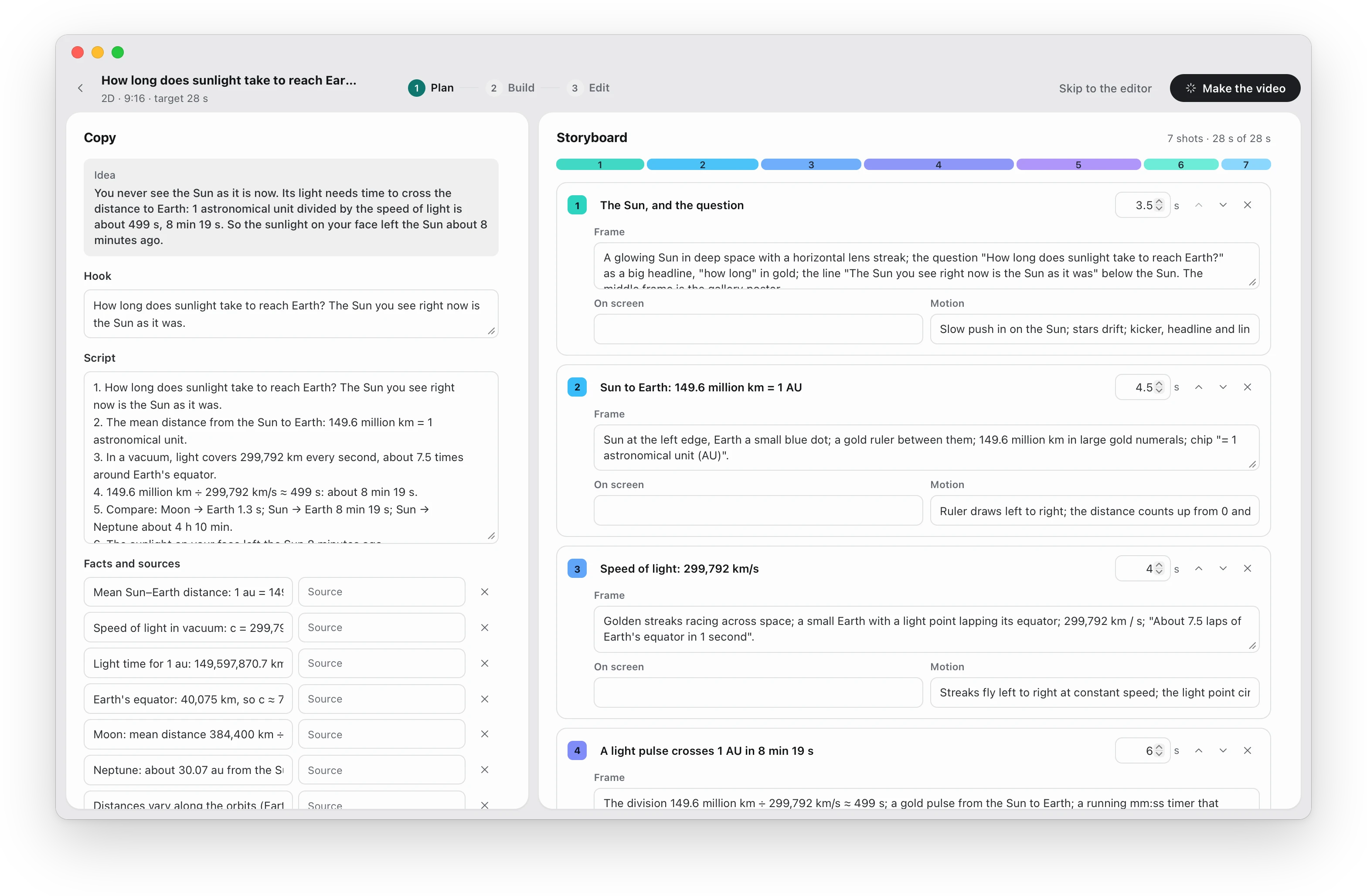
Shotloop is a free, open-source Mac app for making short explainer videos with code and AI. It turns an idea into a short video made of code. You write the hook, script and storyboard with the AI, and it builds the film as a row of shots: 2D pages drawn in Chrome, or 3D scenes rendered in Blender. Each shot is its own loop: generate, render, review, fix.
When one shot is wrong, you say what's wrong in plain words, and only that shot renders again. The rest of the film comes from the cache.
Why one shot at a time
I made the explainers on this site with a pipeline that rendered the whole film for every check. Feedback was almost always about one shot: the subject too small, hidden behind a caption, nothing moving. Each check still cost a full render, about 8 minutes as a draft and an hour final. Shotloop is that pipeline, rebuilt around the shot.
How it works
| Step | What happens |
|---|---|
| Plan | Write the hook, script and storyboard with the AI before any shot exists. |
| Shots | The film is split into shots, each with its own timing, camera and code, written in shot-local time so editing one never shifts another. |
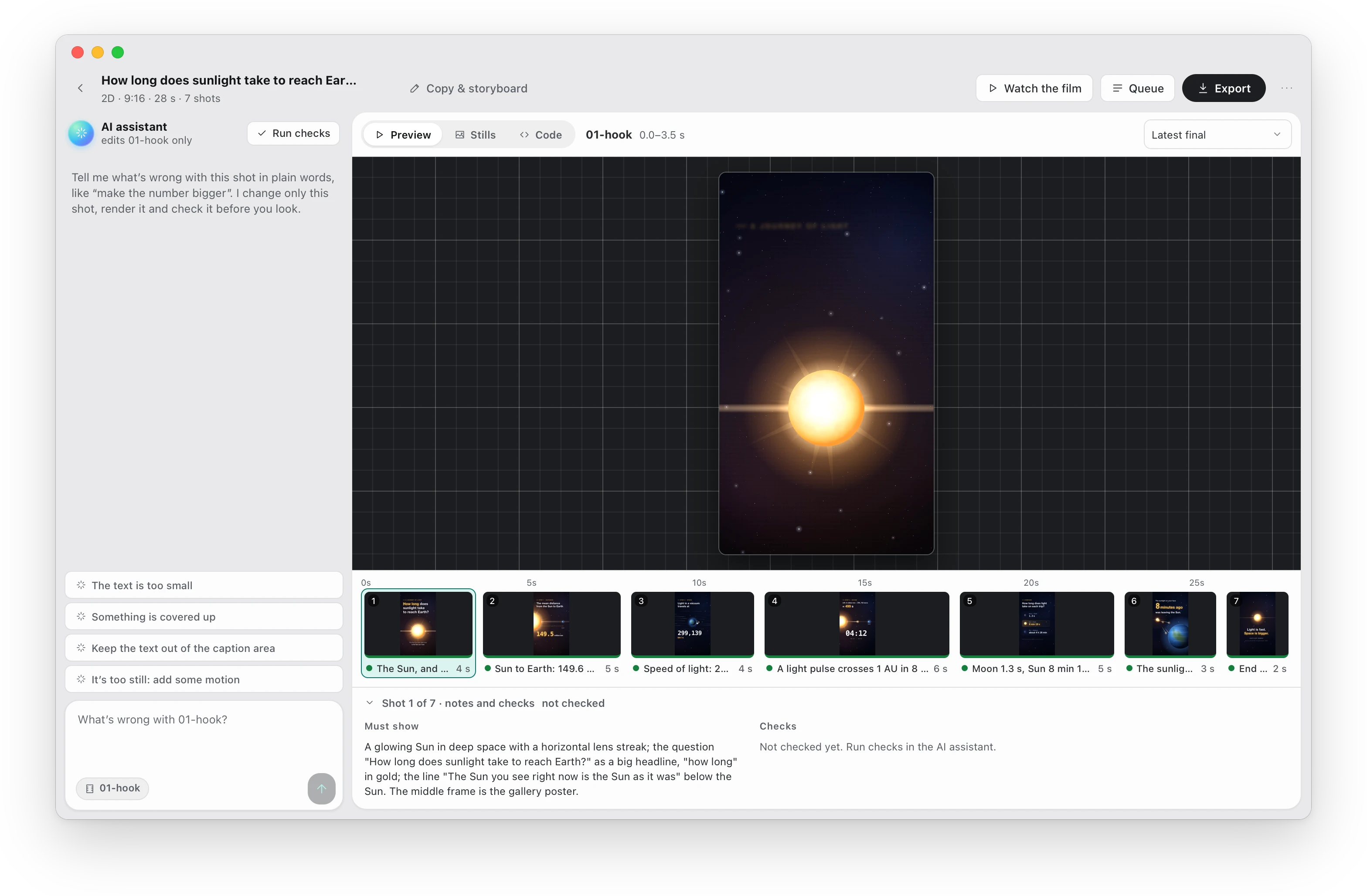
| Check | Before you look, the AI reviews stills of every shot against a checklist: is the subject readable, clear of the captions, is something moving? |
| Fix | Ask for a change in plain words. You see it as before/after stills with a divider you can drag. |
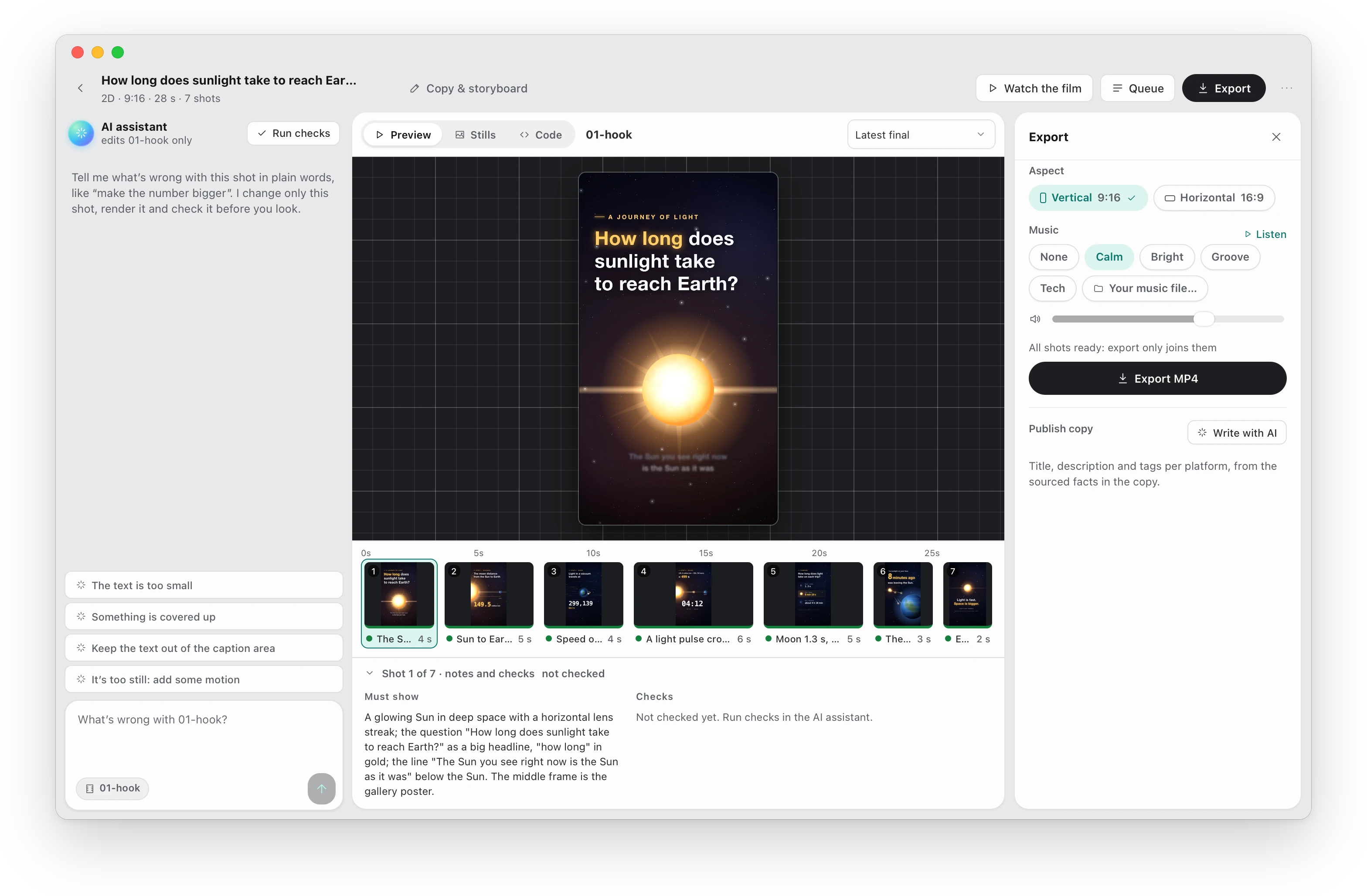
| Export | Only changed shots render. Music, cover image and the publish copy for each platform (title, description, tags) come with the film. |
The same project always gives the same frames: no randomness, no stock footage, no timeline editor.
How it compares
| Tool | What it is | How you iterate | Cost |
|---|---|---|---|
| Shotloop | A Mac app for the whole loop: plan, 2D (HTML) or 3D (Blender) shots, AI checks, export with music and publish copy | Per shot: only the shot you change renders again | Free, Apache 2.0 |
| Remotion + Claude Code | A React framework for video, with Agent Skills for coding agents | Edit the React code, render again | Free for individuals and companies of up to 3 people; a company license above that (terms) |
| HyperFrames (HeyGen) | An open-source framework that renders HTML to MP4 for agents, released April 2026 | Edit the HTML, render again | Free, Apache 2.0 |
| Motion Canvas | A TypeScript animation library with a live preview editor | Code with a real-time preview | Free, MIT |
| Runway, Sora, Veo | AI models that generate video pixels | Prompt again; the result isn't code you can edit | Paid |
If you already build in React and render in the cloud, Remotion has the larger ecosystem. Shotloop is for making the whole short in one app on your Mac, with any AI you choose, and fixing it one shot at a time.
Choose your AI
Shotloop works with your own key for Anthropic, OpenAI, Google Gemini, OpenRouter, DeepSeek, Qwen and other providers, with Claude Code signed in on your Mac, or with a local model in Ollama, LM Studio or any OpenAI-compatible server. The AI can only read and write the project's files and render stills. It can't run shell commands.
Availability
Shotloop is out, free, and open source under the Apache 2.0 license (on GitHub). This version runs on Macs with Apple silicon and needs Google Chrome; 3D projects also need Blender.
It is not signed or notarized by Apple yet, so macOS blocks it the first time you open it. Go to System Settings → Privacy & Security and click Open Anyway. After that, Shotloop updates itself from GitHub releases.
Changelog
- 0.2.1Oct 29, 2026
- 59dd95aREADME: a product page, in English and Chinese, with screenshots
- 9194c95Planning page: a built project's hook and script come from script.md
- 0.2.0Oct 29, 2026
First public release.
All changes ↗
Questions
Is Shotloop a Remotion alternative?
For short explainers and promos, yes. Remotion is a React framework you build videos in; Shotloop is a desktop app that plans the video with you, writes each shot as code (HTML for 2D, Python for Blender 3D), checks it and re-renders only what changed. It's free and Apache 2.0 for everyone, companies included.
Can I make videos with Claude Code?
Yes. Pick Claude Code in Settings → Models and providers and Shotloop drives it headless on your Mac with your existing sign-in: it writes and fixes shots through Shotloop's own tools and can't run shell commands. No API key is needed.
Why does macOS say Shotloop can't be opened?
Shotloop isn't signed or notarized by Apple yet, so the first time you open it, go to System Settings → Privacy & Security and click Open Anyway. You only do this once: after that, Shotloop updates itself from GitHub releases.
What do I need besides the app?
Google Chrome, which renders the frames. Node.js and ffmpeg come inside the app. For 3D projects you also need Blender; Shotloop asks for it when you create one.
Do I need an AI subscription or an API key?
You need some AI to write and fix shots, and you choose which: your own key with Anthropic, OpenAI, Google or another provider, Claude Code already signed in on your Mac, or a local model through Ollama or LM Studio. Keys stay on your Mac. Rendering, the render cache and export work without AI.
Does it run on Intel Macs or Windows?
Not yet. This version is for Macs with Apple silicon (M1 and later). Apple menu → About This Mac → Chip tells you which one you have.
Can I use the videos commercially?
Yes. The videos are yours. Shotloop is open source under Apache 2.0, and the music beds are generated from your project, not licensed tracks. 3D models from the asset library keep their own licenses: most are CC0, and some from Poly Pizza are CC-BY, which asks you to credit the author.
Found a bug, or a miss?
Reports go to GitHub Issues, in public. Never paste secrets. For a real malicious sample, send its hash and where it came from, not the file.